Micro for Desktop, CRM Migration, and a Rebuilt Sidebar
Micro is now a Mac app, Attio and HubSpot can migrate into Micro through chat, and the sidebar, developer console, and iPhone app all got major updates.
Brett GoldsteinJuly 31, 2026
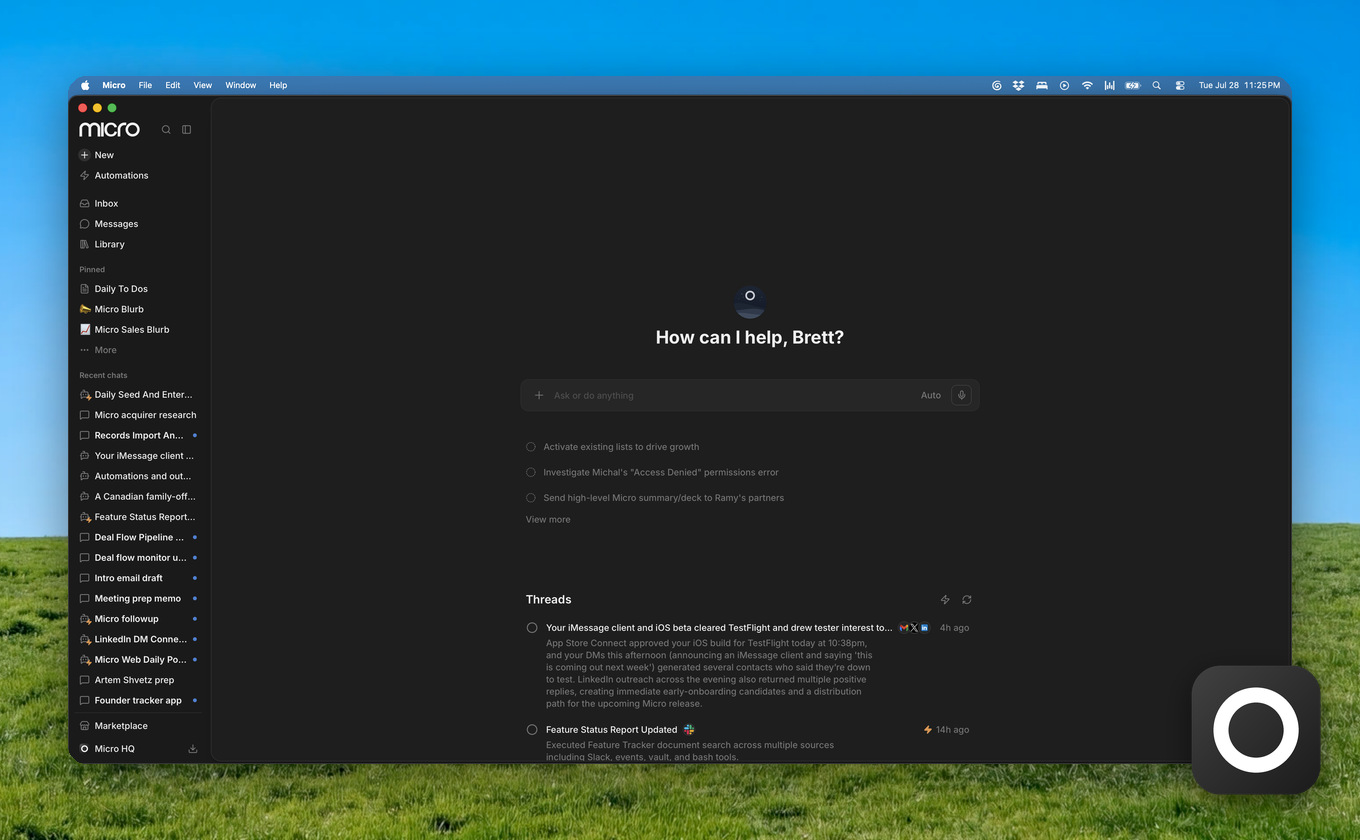
Micro runs on your Mac now, the sidebar is rebuilt, and developers get a real console.
Micro For Desktop
Micro is now a Mac app. Download it from the sidebar download menu and pick Desktop. It installs from a notarized DMG, Apple Silicon for now.
The immediate win is notifications. When an AI chat finishes or an automation completes, you get a native Mac notification. Click it and you land back on that thread. Agents that take a few minutes are a lot more useful when you don't have to sit and watch them run.
More on what's coming next in Introducing Micro for Desktop.
Move Your CRM To Micro
You can now migrate from Attio or HubSpot without rebuilding everything by hand. Go to Settings → Import & Migrate, connect your CRM, pick the lists you want, and the agent handles the rest in chat.
It maps your source fields onto Micro, creates missing properties when needed, keeps related people and companies connected, and checks the imported records before it calls the migration done. Large migrations can resume in the same thread instead of starting over.
Using Salesforce, Pipedrive, or something else? The same page has a contact option and we'll help with the move. The longer version is in Move Your CRM to Micro.
A Rebuilt Sidebar
The left nav is a narrow rail now. Clicking a section opens a second column beside it instead of shoving the rest of the app around. Chats sit at the top because that's what most people use most.
Secondary navigation got unified along the way. Lists live with records instead of in their own place. Library holds documents, artifacts, and lists. Recents, Pinned, and Threads show skeleton rows while they load instead of flashing an empty state.
The rest of the app now lines up with it. Titles and tabs share the same rhythm across Inbox, CRM apps, People, Companies, Tasks, Documents, Automations, and Marketplace. Object pages are a consistent width. Creating things moved into the New menu in the left nav.
The icons also animate on hover. The awning lifts off the store, a letter rises out of the inbox, typing dots pop into Messages. Turn on reduced motion and they hold still.
Faster Chat And New Models
Pro now runs on Claude Opus 5, and so does the coding agent by default. Kimi K3 and Grok 4.5 are in the model picker too.
Chat starts responding sooner, and the stalling indicator stops showing up when nothing is actually stalled. If the connection drops mid-answer, Micro reattaches silently and keeps the response going instead of leaving you with half a message.
When a model provider is having a bad day, the picker says so. You can also pick which model each subagent uses in Agent settings.
The Developer Console
There's a developer console in the app now. API keys, usage, webhooks, your data model, connected integrations, and billing all live there instead of being buried in settings.
This is the front door for Micro Blocks, the platform underneath Micro. If you want the longer version of why we built it, that's in Introducing Micro Blocks.
The developer API picked up a few things too. You can list saved views, imports can create select options they haven't seen before instead of failing, and reads return readable values instead of raw ids.
Micro For iPhone
Two releases since the last update.
Contact and company profiles got a real upgrade. Edit the summary, about, and detail fields inline, or let AI fill them in, plus new Meetings, Files, and Links sections. You can comment on activity from a profile, see which teammates are connected to a contact, and delete or block someone without leaving the page.
Email got faster and fuller. Compose new mail with Gmail-style To, Cc, and Bcc and recipient autocomplete. Browse your Gmail folders and labels. Marking a thread done jumps you to the next one. Email notifications show the sender's photo and open the thread instantly, even from a cold start.
AI drafts stream in as they're written, chat opens with a quick answer while the full reply is prepared, and chat history now shows every conversation including automation runs, in the right order.
More Improvements
- Ask who you should talk to in a given city and the agent actually goes and finds them, by role and by firm
- Snippets accept dynamic context variables, so a saved snippet can fill itself in
- Press Cmd+L in a document to send your selection straight into chat, quote and all
- Email composers seed your Gmail signature automatically
- Emailing a list can now use a different body per recipient
- Select several automations and pause, delete, or chat about them in bulk
- The agent can read PDF and CSV attachments on emails
- Web research is noticeably faster
- Chat wastes fewer credits on the first turn, and model pricing is visible when you pick one
- Pick your preferred meeting note taker in Meeting Preferences
- LinkedIn threads have reply-draft chips in the composer, and Home's Messages section now includes LinkedIn threads that need a response
- Marketplace packs got cover art, list templates, a works-well-with section, and more packs are actually visible
- The coding agent shows its thinking, its shell output in terminal cards, and inline diffs of file changes
- Messages on Home can be filtered by Unread and Others, and promotional senders stay out
- Tabs can be dragged to reorder, and tab bars are consistent across the app
- Onboarding seeds suggested automations once you pick a persona
- Members get an email when their sharing access changes
- Favorites show current titles instead of stale ones
- Custom MCP connections show up in connection lists and sort alphabetically
- Integrations with expired auth surface a reconnect card instead of failing quietly
- Revoked API keys no longer clutter the key list
- Socratic, a new typography option that puts serif type on reading surfaces while the rest of the UI stays put
Bug Fixes
- Email HTML is always sanitized before rendering
- Draft bodies come back on undo-send and when reopening a draft, and deleting a draft stays snappy when the server lags
- Gmail drafts show up in the Drafts view, and the Drafts tab no longer renders an "undefined NaN" group
- Inline attachments are detected correctly, and non-image attachments that were mis-flagged show up in the thread again
- Email search returns Gmail threads that haven't synced yet
- Profile Messages sections find threads where the person was on any line, not just the sender
- The thread Overview sidepanel sits beside the message pane instead of on top of it
- Inbox refreshes when you change quick filters, and status views match the thread's most recent message
- Automation schedules respect your timezone, including the spring-forward edge cases
- Live meeting transcripts stay in order when catch-up frames arrive, and shared transcripts are accessible to the people they were shared with
- Credit top-ups that already completed no longer bounce you to checkout
- Deleting your account cancels your subscription
- Attachment downloads check ownership first
- The slash menu in the editor no longer gets clipped
- Publishing and previewing generated apps gives a real error instead of a dead end
- Task detail spacing, activity avatars, and grid columns with missing roles are all fixed