Live Meeting Assistant, 1,000+ Integrations, and Context-Aware AI
Live Meeting Intelligence is out of beta, the full integrations catalog is available, and Micro carries more context into chat.
Brett Goldsteinv3.0.0
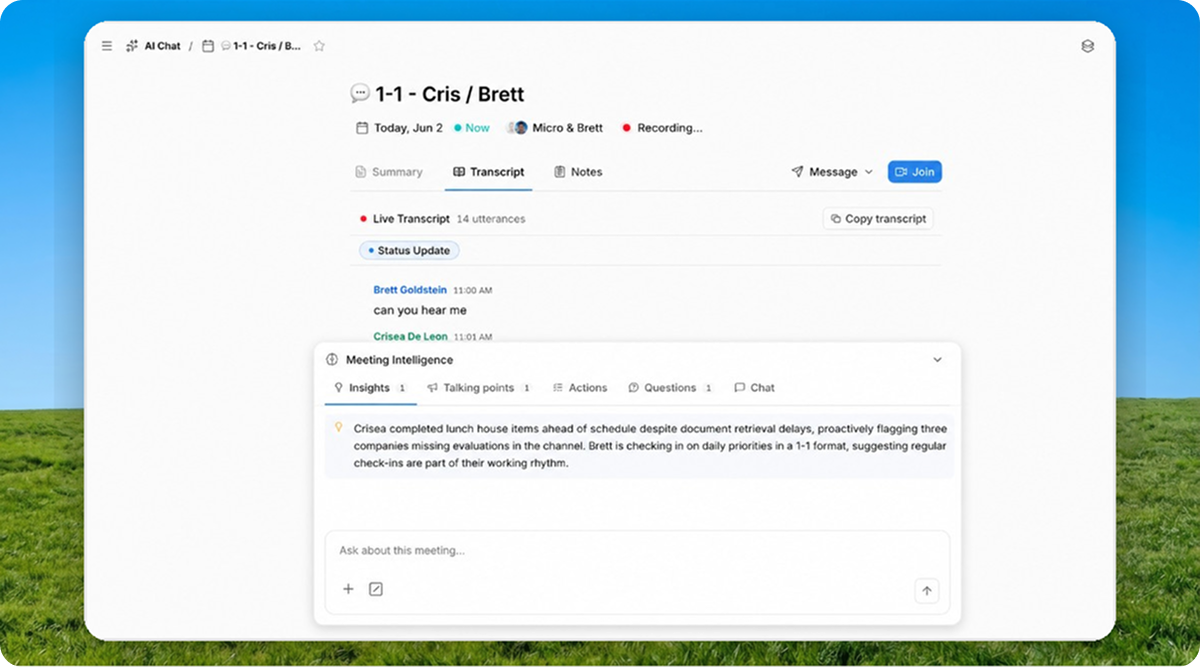
Micro now has Live Meeting Intelligence out of beta, 1,000+ integrations, and chat that understands more of the page you are already looking at.
Live Meeting Assistant Is Out Of Beta
Live Meeting Intelligence is now a core part of Micro.
Meetings now bring transcript context into the assistant, show a dedicated meeting panel, and help draft action items from the conversation. The goal is simple: keep the meeting, transcript, next steps, and follow-up work in one place.
This release also made the meeting assistant easier to trust during real calls. Chat streams resume after tab switches, meeting context stays available, and the assistant is better at continuing from the same conversation.
1,000+ Integrations
Settings now has the full integrations catalog, which means you can connect OAuth apps across 1,000+ services.
The catalog works for teams. Install personally or shared, add nicknames so every account does not look identical, pick the right workspace, and connect tools from chat without breaking flow.
Any team member can install by default. No admin bottleneck for the app you need right now.
Context-Aware AI
Open chat from a CRM view, inbox thread, or calendar event and Micro carries that context with you, even in fullscreen. It sees filters and the thing on screen, so you do not have to explain "the pipeline I am looking at" again.
Pro users are on Claude Opus 4.8. Chat also got better continuity across tab switches and stream resumes, so longer answers are less likely to feel interrupted.
Context docs also got categories, and document updates are more reliable across chat turns. That gives Micro a cleaner way to separate durable background from the thing you are asking right now.
iOS Inbox And Automation Push
Micro on iOS has a real Inbox tab now.
Read threads, filter by view, and Reply All from the composer. It is the email client you have been using on web, but in your pocket.
You can also turn on push per automation, so you get pinged when a scheduled run finishes. Not every incoming email. The useful thing.
Create an account on Micro, then download the iOS app.
More Improvements
- Suggested tasks now have Accept/Dismiss on kanban cards and list rows
- Tasks use a status picker instead of a checkbox
- Email follow-up tasks graduated from beta
- You can archive and unarchive chat threads
- Chat scroll and tab switching should feel less janky
- Marketplace is always in the sidebar now, and the sidebar has a proper Records section
- iOS got a list templates picker, a reconnect banner when email lapses, and onboarding chat after setup
- Public API and the integrations catalog graduated from beta
- Deal creation works better across kanban and grid
- Email thread sidepanels dedupe participants more reliably
- The Files tab recovers unusual attachment shapes instead of falling over
Bug Fixes
- Chat resumes more reliably after switching tabs
- Email follow-up tasks and suggested tasks are easier to act on from kanban and list rows
- Context documents update more reliably across chat turns
- Deal creation is more reliable across kanban and grid views
- Email thread sidepanels show fewer duplicate participants
- The Files tab recovers better when attachments arrive in unexpected shapes
- iOS handles email reconnect states more clearly